Running replay video: your run in 3D, seen from the street
A 3D run replay that follows low above the road, not from a satellite.
At a glance
- RunVue turns a run you already recorded into a short vertical 3D replay video, seen along the streets you actually ran by a camera that follows low above the road.
- It is for runners who track with Apple Watch or a running app and want a memorable video of a route, a race or a monthly recap instead of a screenshot of a map.
- What sets it apart: a street-level tracking camera instead of a satellite view, a pace and heart-rate HUD, and a video that is built entirely on your iPhone.
If you search for a running replay video or a 3D run replay, you usually find apps that record the run or draw a flat route on a map. RunVue starts after the run. Import a running workout from Apple Health, the route your Apple Watch or running app already saved there, or bring in a GPX or FIT file from a device that does not save routes to Health. RunVue builds a 3D scene of the streets and buildings along your route, matches your GPS track to the road and renders the replay on your iPhone.
The result is a 9:16 video you can save to Photos or share. A tracking third-person camera follows your run, a HUD shows pace and heart rate, a mini-map and section cards show your splits, and a final aerial sweep shows the whole route. You choose the map theme and music before you save, and you can preview first.
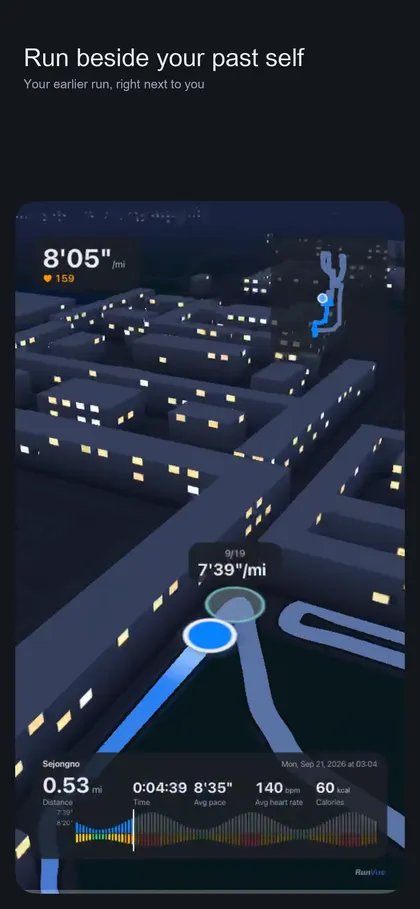
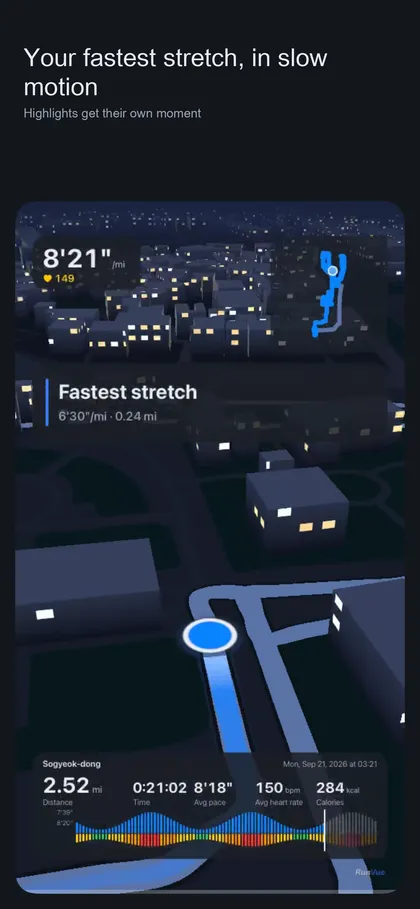
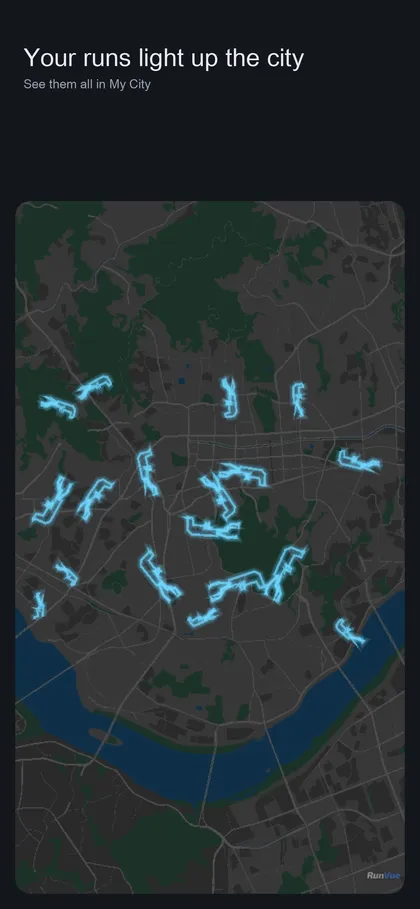
Beyond a single run, you can run against your own past run on the same course, replay the light and weather from the day you ran, let the app slow down your fastest stretch, and layer all your runs on one city map to make monthly recap videos.
What it does
A 3D run replay seen from the street
The camera follows low above the road through the 3D streets and buildings built from your route, so the video feels like running it again. The video ends with an aerial sweep of the whole course with the streets and landmarks you passed.
Pace and heart-rate HUD, mini-map and section cards
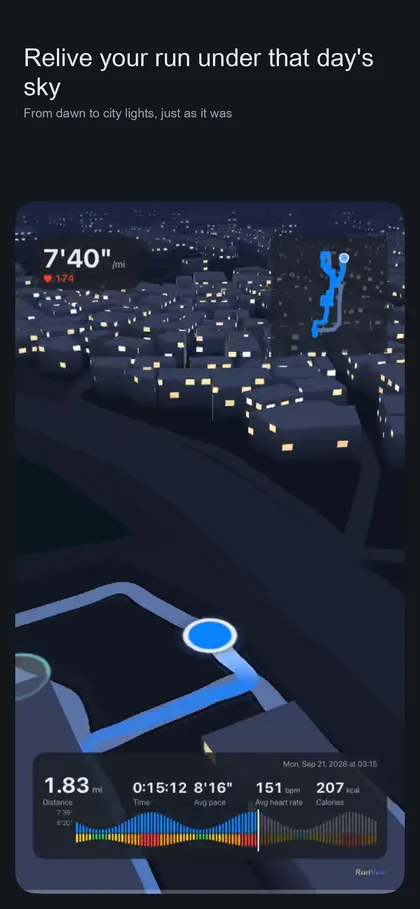
Pace and heart rate appear on screen, with a mini-map, section cards with splits, and a pace and heart-rate waveform along the bottom and in the ending.
Sky of the day, ghost race and moments
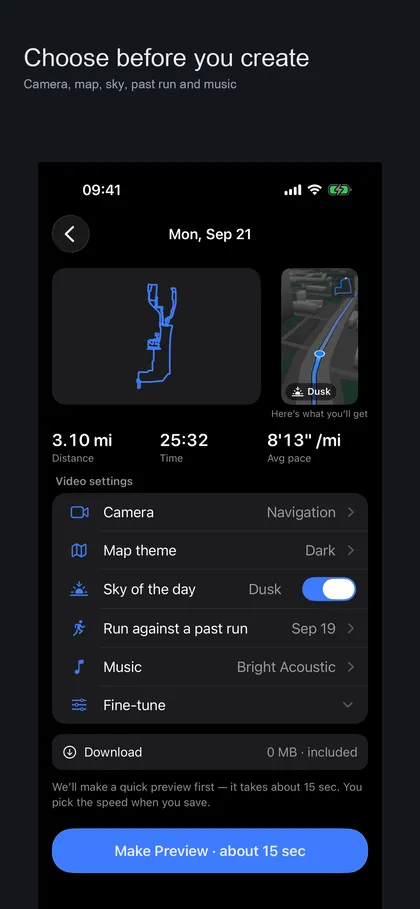
Sky of the day reproduces the light and weather from when you ran. Ghost race puts a past run on the same course beside you. Moments shows your fastest stretch, biggest climb and final push in slow motion.
My City and monthly recap videos
My City layers your runs on one city map. This month and Last month recap videos are available to everyone; Year and All-time recaps need Pro.
Vertical video, map themes and music
Export a 9:16 video to Photos. Three map themes and five background music tracks are included, with preview before you save, and every run can be made at 1x and Summary speed with no limit on how many videos you create.
Screenshots
Requirements and details
| Platforms | iPhone, Android |
|---|---|
| Requires | iOS 17+ |
| Platforms | iPhone and Android (on Google Play) |
| Requirements | iOS 17 or later; Apple Health workouts with a GPS route, or a GPX or FIT file |
| Input | Running workouts from Apple Health; GPX or FIT import |
| Output | Vertical 9:16 video saved to Photos or shared |
| Speeds | 1x and Summary for everyone; 2x to 60x with Pro |
| Cameras | Tracking and Navigation camera; Cinematic, Calm, Oblique and Aerial presets with Pro |
| Maps | OpenStreetMap data, shown in every video's closing credit; map tiles downloaded by coarse region |
| Languages | 12 languages |
| Trial | 1-month trial of Pro for new subscribers |
Limits, stated honestly
- RunVue does not record runs. It only turns runs already saved in Apple Health, or imported as GPX or FIT, into videos, and it is not a live tracker or a coach. Treadmill and indoor workouts without a GPS route have no path to follow.
- The video shows your whole route from start to finish and the app has no feature to mask a section, so a run that starts at home can reveal where home is. Choose carefully who you share it with.
- A small RunVue watermark appears in every video, with or without Pro, and the OpenStreetMap credit in the ending cannot be turned off.
- Where building height data is missing the app draws an average height, so routes among tall buildings or tunnels can look imperfect. 3D rendering happens on your iPhone, so older devices take longer.
- Without a Pro subscription, one ad is shown after you save a video (Pro shows no ads). Speeds above 1x, extra camera presets, camera height and zoom, racing any past run, and Year and All-time recaps need Pro.
Frequently asked questions
How do I make a running replay video from my run?
Open RunVue, pick a running workout from Apple Health or import a GPX or FIT file, choose camera, map theme, sky and music, then make a preview and save the video to Photos. The settings screen says a preview takes about 15 seconds.
Does RunVue record my run?
No. It works from runs that are already saved in Apple Health, or from a GPX or FIT file. Use your Apple Watch or running app to record.
What is a 3D run replay?
It is a short video in which a camera follows your recorded route through a 3D model of the streets and buildings along it, with a HUD for pace and heart rate, instead of a flat map line.
Which parts need Pro?
Unlimited videos at 1x and Summary speed, the Navigation camera, the HUD, map themes and music are available without Pro. Pro unlocks speeds from 2x to 60x, the Cinematic, Calm, Oblique and Aerial camera presets, camera height and zoom, racing any past run, and Year and All-time recaps. New subscribers get a 1-month trial.
Can I hide my home location?
The video shows the entire route and the app cannot mask a section, so decide who sees the video before you share it.
Does the video leave my iPhone?
The video is rendered on your iPhone and your GPS route, precise location and Health data are not sent to a server or to ad or measurement SDKs, except for videos you share yourself. Maps are downloaded only as coarse regional tiles.